For cafés, restaurants and bars

HR platform for restaurants: shift schedule, clock-in, pay calculation and reports

Managers build the rota, see who is on shift and get a timesheet ready for payroll. Staff open their own shifts, hours and pay rules on the phone or in Telegram. Both sides see the same hours and the same rule they were counted by.

Free for up to 5 staff. Bigger teams get 14 days of any plan with no card. Nothing to install. The demo opens your own copy of Poseidon Café for 24 hours.

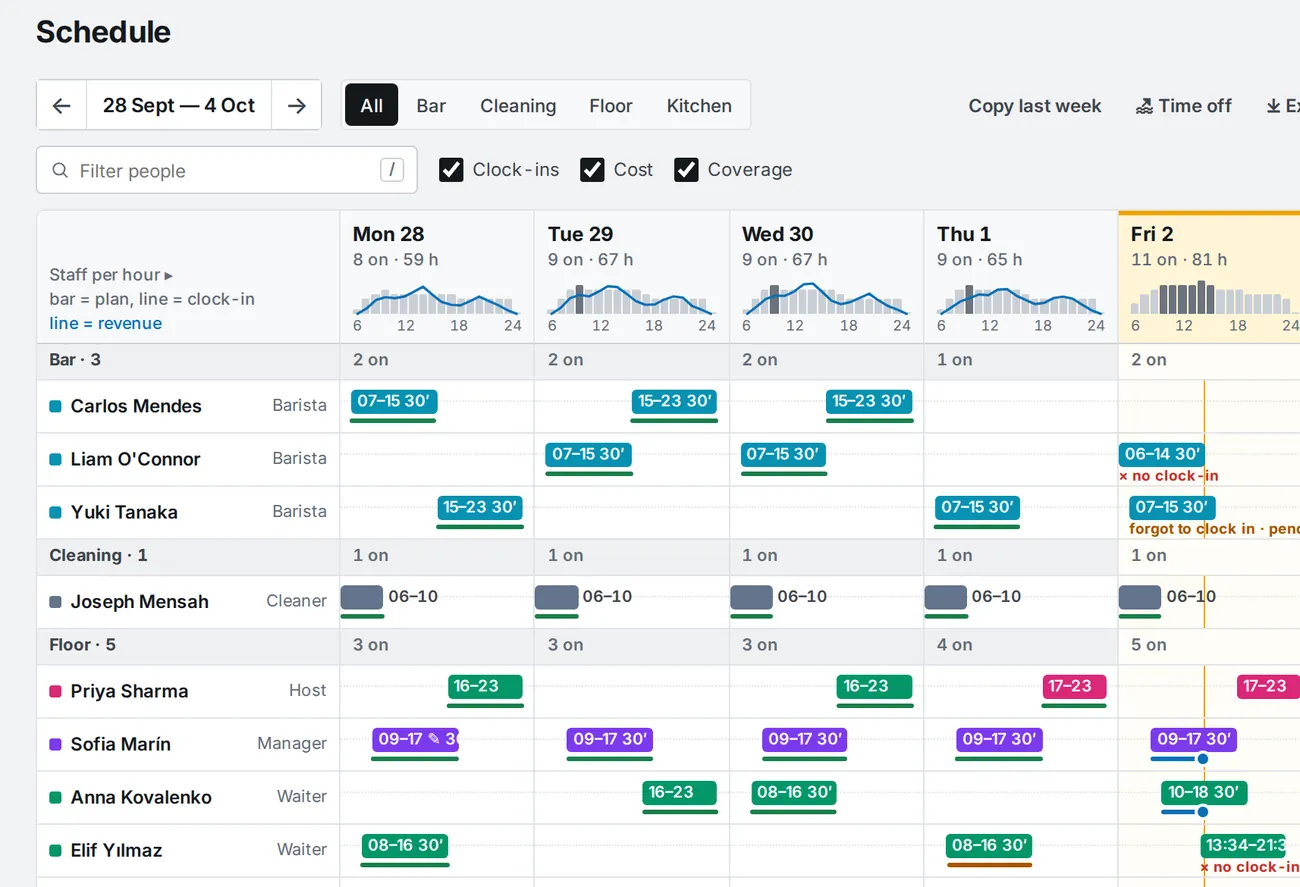
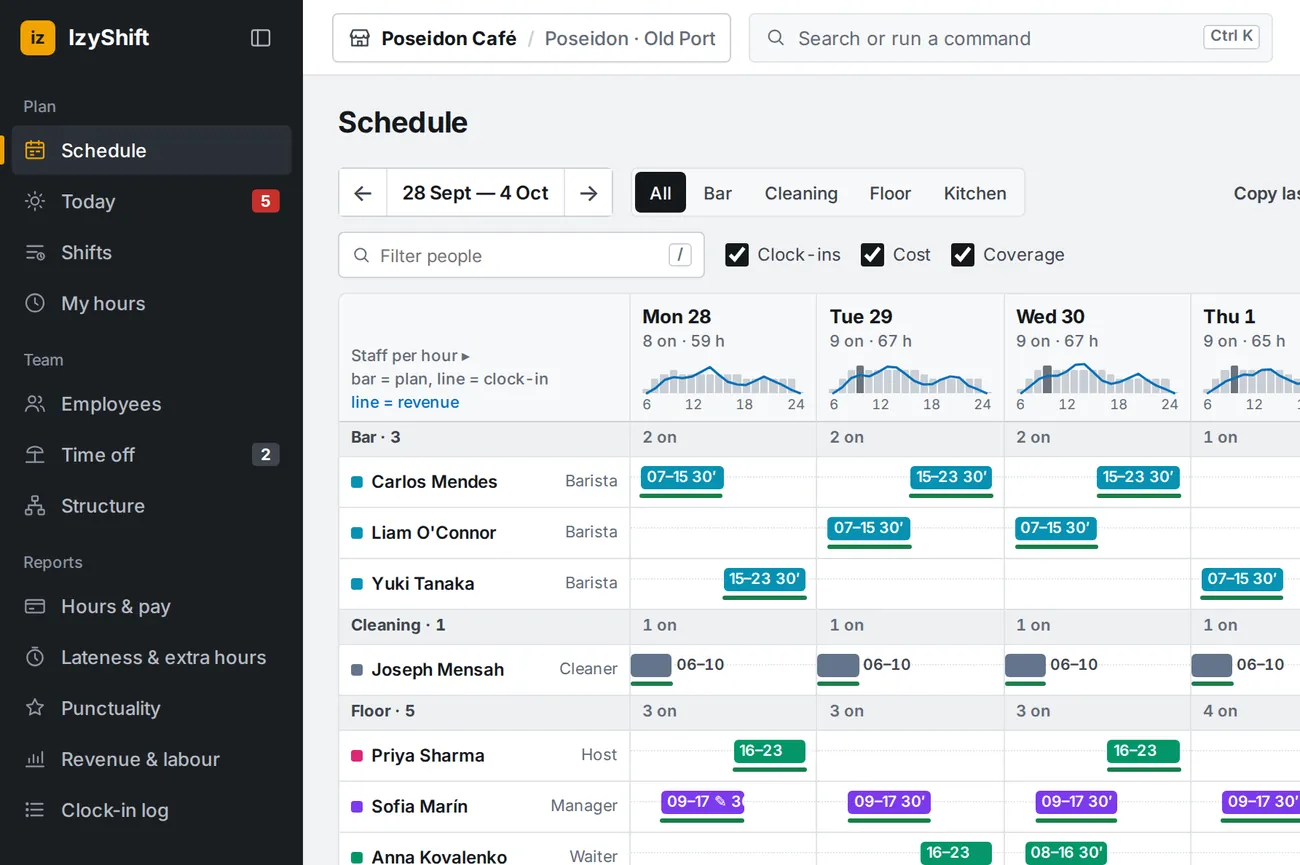
Week schedule: staff-by-day grid, shifts in role colours, clock-in lines
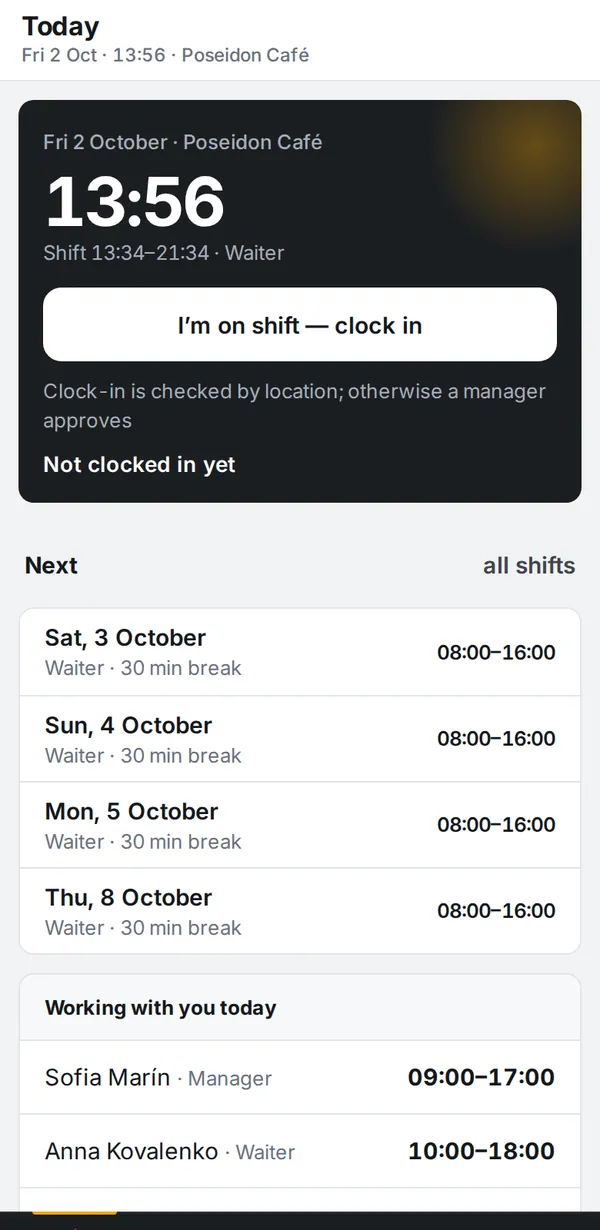
Employee's phone: today's shift, the “I'm on shift — clock in” button and upcoming shifts
Managers see the whole team
Staff see their own shift
Over 5,900 shifts and 4,700 clock-ins handled so far Staff have nothing to install EN, RU, UA, EL: everyone picks their own language
One platform

One system in place of spreadsheets

Usually the rota lives in a spreadsheet, clock-ins in another app, questions in a group chat, and hours are counted by hand. In IzyShift it is one chain: shift → clock-in → hours → pay → report.

Works for both sides

Managers see the whole team, staff see their shifts

The same data, different screens. Managers see every shift and clock-in at the venue, staff see only their own.

📋

For managers

owner, general manager, shift lead
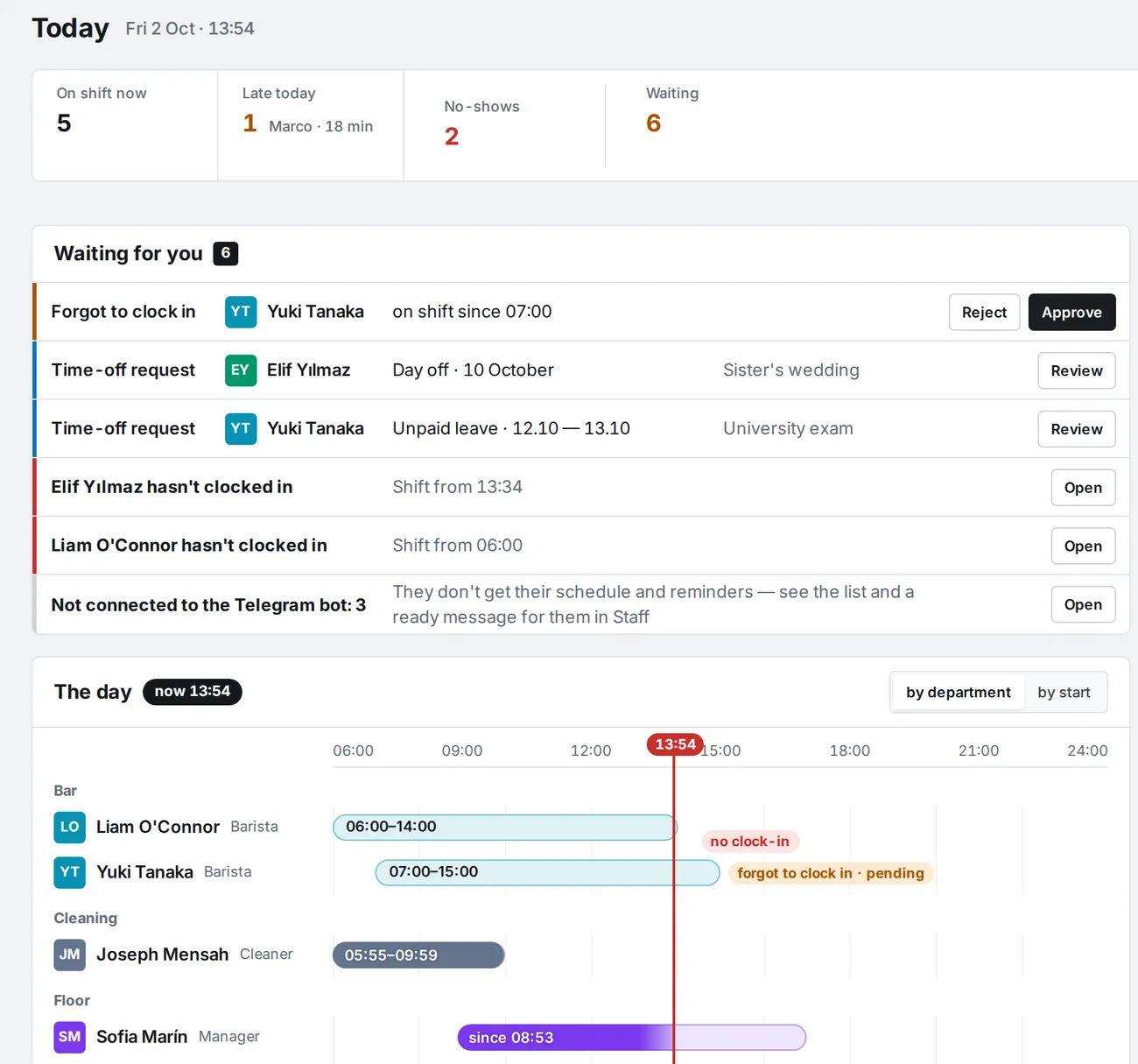
  • Who is on shift, from your phoneThe Today screen shows who is on shift, who has not clocked in yet and which requests need a decision. No need to call around and check.
  • Pay rules set onceSet grace, rounding and overtime once. Every clock-in is then counted by those rules, no manual recalculation.
  • Reports export to ExcelHours & pay, timesheets, labour vs revenue and punctuality for a week, a month or any period, with export to Excel.
  • Fewer hours spent on the rotaA week takes ten minutes by hand, or autofill does it with a reason for every pick. Requests and fixes are approved from the phone.
🙋

For staff

waiters, baristas, cooks — anyone on the team
  • Their schedule on their phoneTheir shifts for the week on the phone and in Telegram. If the manager changes something, a message arrives.
  • Clock in from the phoneOne tap in the app, in Telegram or on the tablet at the venue.
  • They see how hours were countedScheduled and clocked hours side by side. The company's rules are known up front, and every correction names the rule behind it.
  • Notifications in their languageA new schedule, a reminder before the shift and every change to pay arrive by Telegram, push or email.
  • Availability and shift swapsStaff mark when they cannot work, give away or swap a shift. A colleague accepts, the manager approves.
  • Leave and days off by requestA day-off request takes a couple of taps, and the manager's decision arrives the same way.

The result: fewer questions in the group chat, fewer recalculations and fewer “why is it like this” conversations.

New

Planning, pay and team communication

Autofill for the rota, bonuses and deductions with a reason, and messages that reach staff even without Telegram.

✨

Autofill

Fills gaps against your staffing norms and open shifts, respecting position, availability, leave, rest between shifts and daily and weekly hour limits. Balances hours, keeps to a labour % budget and explains why each person was picked. Shifts land as drafts.

🗓

Availability and conflicts

Staff mark when they cannot or want to work, the manager approves. The grid flags conflicts right away: cannot work, too little rest, too many hours, wrong position.

📈

Forecast and staff per hour

The revenue forecast comes from 8 weeks of Syrve POS history, aware of Cyprus holidays, or from your own numbers. From it IzyShift counts the people each hour needs and the week's budget. Staffing norms and week templates are set here too.

🔁

Open shifts and swaps

Only people with the right position see an open shift. They apply, the manager assigns. Staff can also give away or swap a shift: a colleague accepts, the manager approves.

🔔

Telegram, push, email

Each person picks channels and their order. Without Telegram, a browser push or an email arrives instead. Reminders go out the evening before and N minutes before the shift, and quiet hours are respected.

📣

Announcements

To everyone, a venue, a department or a position. See who has read it and who has not. A reminder goes out on its own, or you send one yourself.

✅

Shift checklists

Opening, closing, hygiene: items with a photo and a comment. The manager reviews them, and a report by venue and person exports to Excel.

📥

Import from Excel and CSV

Staff and the schedule load from a file: a template, a preview, per-row errors, email invitations. Shifts arrive as drafts.

💶

Bonuses and deductions

A bonus, deduction or allowance is recorded as a line in a log: amount, date and reason. It shows in “Hours & pay” and in the total to pay, and the employee gets a message with the reason right away. Cancelling needs a reason too.

🔴

Attendance differs from the shift

A red dot on the shift when someone came in early or left late by more than 10 minutes. It does not change pay, but it shows where to fix the schedule or approve overtime.

📲

Telegram for managers

Late arrivals are reported right away. A missing clock-in after 15 minutes, to them and to you. In the evening, one summary of the day's adjustments, and on Mondays the punctuality ranking.

🏢

Multi-venue groups

Several venues in one company. Each has its own terminal and its own Syrve POS, the schedule spans venues, and reports come by venue and for the whole group.

Planning and team communication are on for every new company and in the demo. If you have been with us a while, we switch them on when you ask. Bonuses and deductions, the attendance marker and manager notifications are available to everyone. Multi-venue is set up when you connect.

Notifications

Each person gets their own messages

Staff get their schedule, a reminder before the shift and an explanation of every pay correction. Managers get a short daily summary. Each person picks the channel: Telegram, browser push or email. The language is their own too: EN, RU, UA, EL.

To staff: the week's schedule and a reminder
‹izIzyShiftbot
Sun, 4 October
📅 Poseidon Café — your schedule for 05.10 – 11.10 has been updated Changes: ➕ 1 · ✏️ 1 ▫️ Mon 05.10 · 08:00–16:00 · Waiter ➕ Wed 07.10 · 15:00–23:00 · Waiter ✏️ Sat 10.10 · 11:00–19:00 · Waiter (was 08:00–16:00) ☕ 11.10 · Day off Shifts: 3 · 24 h
📲 Open IzyShift
Today
You haven't clocked in for today's 08:00 shift. Please contact your manager or check your clock-in.
To staff: how their time was counted
‹izIzyShiftbot
Today
You were 15 min late (shift from 08:00, grace 5 min). Today you're paid from 08:15.
The pay correction for 3 Oct was cancelled by a manager.
  • The message arrives right away, not on payday
  • The company rule is visible: the grace period and when pay starts
  • If a manager waives the rule for a shift, they get “cancelled”
To managers: one summary for the day

In the evening one message arrives instead of a dozen: what changed in pay that day and under which rule. The button opens Hours & pay, where any correction can be undone with a comment.

  • Only what affected pay: nothing within the grace period
  • What goes to whom is switched on in Settings
‹izIzyShiftbot
📋 Pay corrections for 3 Oct — Poseidon Café • Nikos Papadopoulos — late 15 min (shift 08:00–16:00) → paid from 08:15 (−15 min) · company rule • Dmitri Volkov — late 22 min (shift 07:00–15:00) → paid from 07:30 (−30 min) · company rule • Liam O'Connor — late 12 min (shift 07:00–15:00) → paid from 07:15 (−15 min) · company rule • Lucas Silva — late 14 min (shift 07:00–15:00) → paid from 07:15 (−15 min) · company rule • Carlos Mendes — late 35 min (shift 15:00–23:00) → paid from 15:45 (−45 min) · company rule • Elif Yılmaz — left 20 min early (shift 16:00–23:00) → paid until 22:40 (−20 min) · company rule Total: 5 late arrivals, 1 early leave, 6 people; 2 h 20 min of paid time removed.
📲 Open Hours & pay
Pay rules

One set of rules, and everyone sees how each hour was counted

The company sets its rules once, and IzyShift applies them to every clock-in. Staff and managers see the same hours and the same explanation, naming the rule each hour was counted by.

⚙️

Your rules

A grace period in minutes, pay by actual time or with rounding, time beyond the schedule only when approved. A single employee can be given individual terms.

👀

Visible to both sides

Staff see their hours and a message saying when pay starts. Managers see the timesheet: plan vs actual for every shift.

🤝

People decide the exceptions

If someone forgot to clock in, a manager approves the fix. A rule can be waived for a shift with a comment.

📆

Nothing recalculated backwards

A new rule applies from a chosen date. Past timesheets are not recalculated.

In practice

A café in Limassol: the first week under new rules

One venue, 24 hourly staff, 130 shifts. Before, shifts lived in another tool and pay strictly followed the schedule. In IzyShift they set the rules: a 10-minute grace period, then pay by the actual clock-in and clock-out time, and time beyond the schedule only when approved.

€335in the first week: pay matched the time actually worked
€1,453a month at the same pace
×32against a €45 subscription per venue per month

A real week (28 Sep – 4 Oct 2026) of a real venue, anonymised. Calculated with the staff's own rates in IzyShift, excluding employer taxes.

🔌POS: Syrve — connected; Aloha, Lightspeed, Oracle Simphony and other POS — on request.What the POS link gives you →
Features

What it does

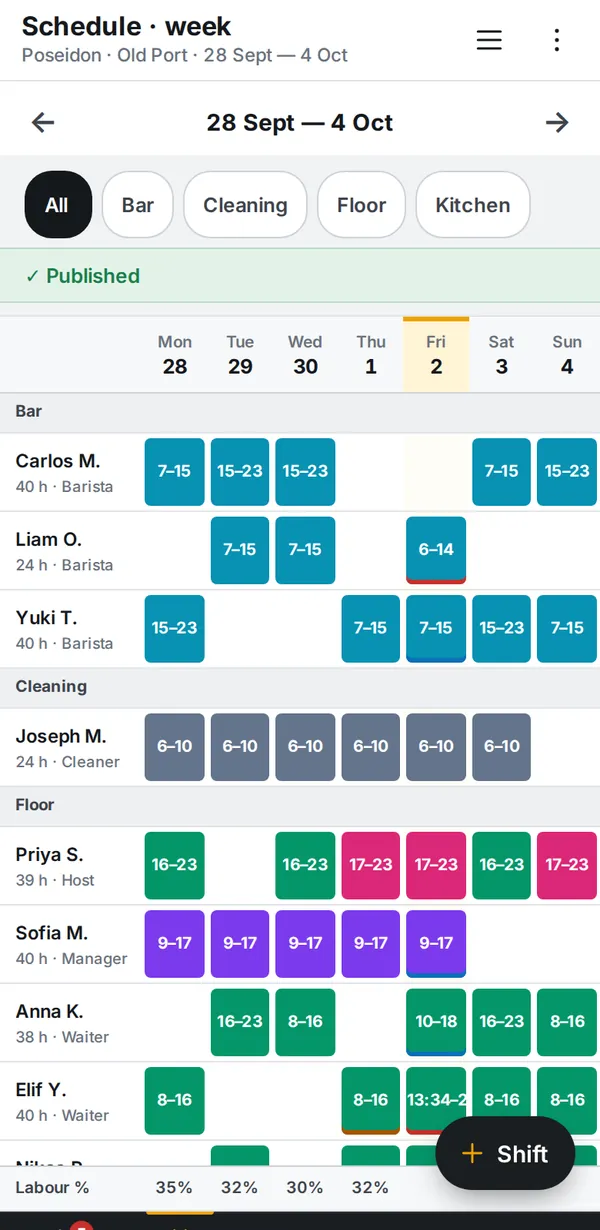
A week in ten minutes

A people × days grid by department: a shift is a bar in its role colour, a draft is hatched, a line under the shift shows the clock-in. Each day's header shows staff per hour and revenue per hour from Syrve, and the footer shows hours, labour cost and labour %.

  • “+ Shift” right in the cell, “Repeat on days”, “Copy last week”, week templates
  • Publishing shows what changed: notify people or publish quietly
  • Search and commands with Ctrl K; keys N — shift, T — time off, P — publish
Week schedule: shifts by department, clock-ins, hours and labour cost

Today: what needs a decision right nownew

Tiles: on shift, late, no-show, waiting for you. A day timeline with a red “now” line: plan as a light bar, actual as a solid one.

  • “Forgot to clock in”: Approve / Decline right in the row
  • No-show: after N minutes without a clock-in, a message to managers and to the employee
  • Clocked in without a shift: managers get “➕ 4 / 6 / 8 h” buttons, and the shift is created from the clock-in
  • Time-off requests and hour limits in the same place
Manager's Today: tiles, decisions, day timeline

Timesheet and deviations in one tablenew

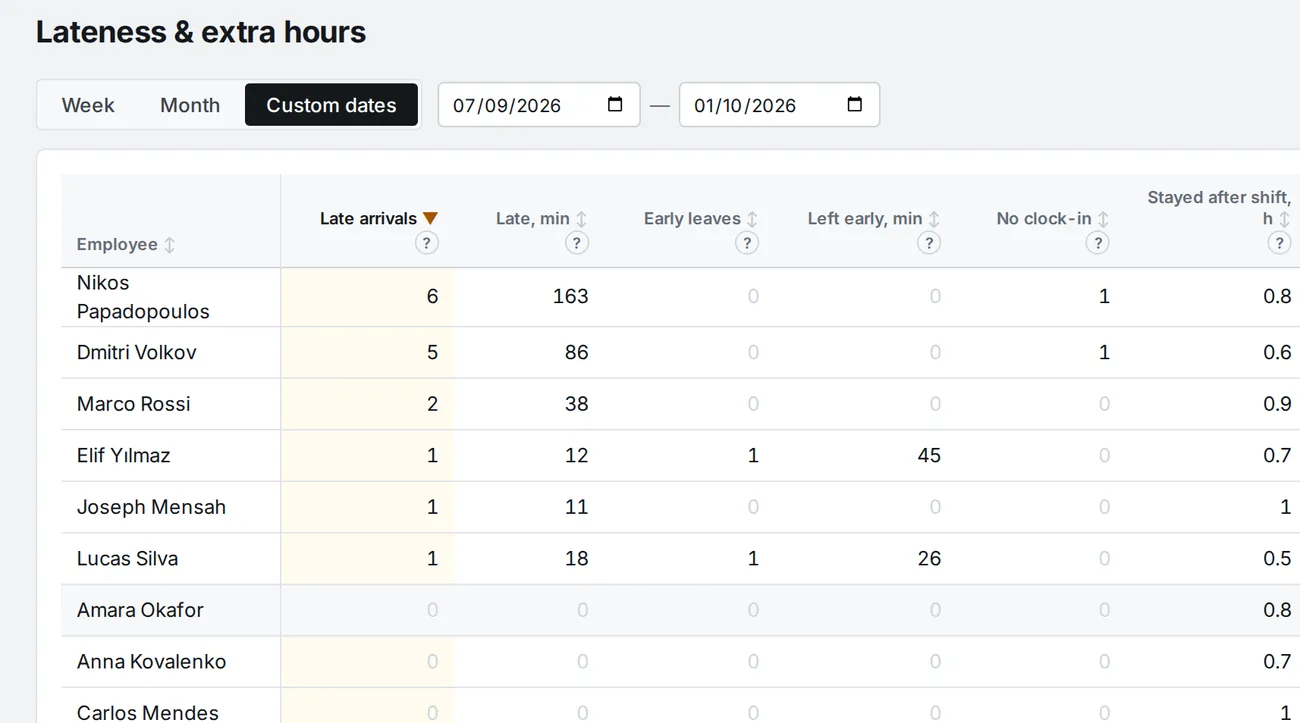
“Late & overtime”: late arrivals, early departures, shifts without a clock-in, “stayed after shift” and “above weekly limit”, sortable by any column. A row opens the employee's timesheet: plan vs actual for every shift.

  • “Hours & pay”: scheduled, clocked, payable and the amount
  • In the timesheet you confirm or fix a shift, or waive a rule with a comment
  • Excel for a week, a month or custom dates
Late & overtime: a per-employee table

Lateness and early-leave rulesnew

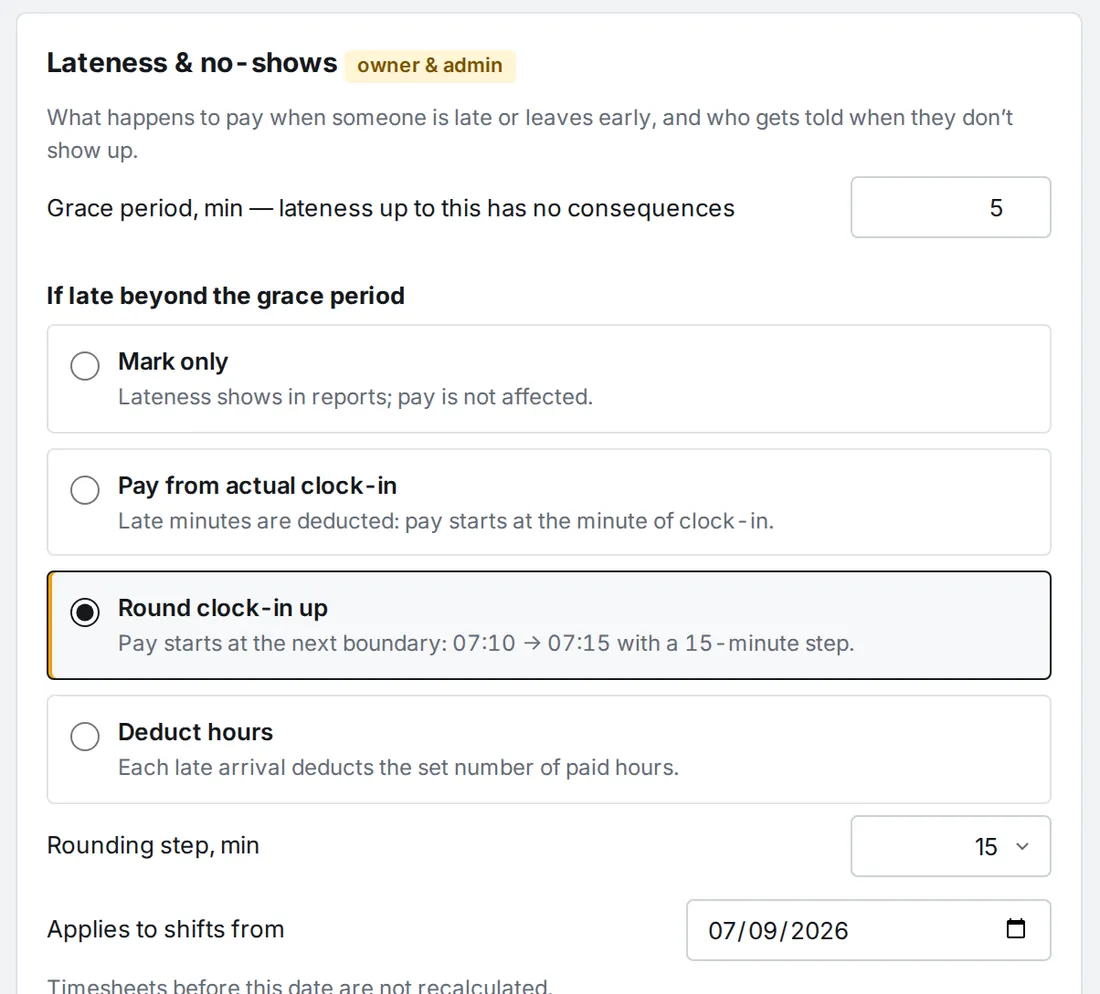
A grace period in minutes and what happens beyond it: just flag it, pay from the minute of arrival, round to 5–30 minutes, or deduct hours. The same for leaving before the end of the shift. A rule applies from a chosen date: past timesheets are not recalculated.

  • Per-employee rules on top of the company rules
  • The employee gets a message right away: “You were 17 min late… Today you're paid from 07:17”
  • Managers get one daily summary of pay corrections
  • No-show and clock-in-without-shift alerts are set up there too
Settings: lateness, early leave, no-shows, correction notifications

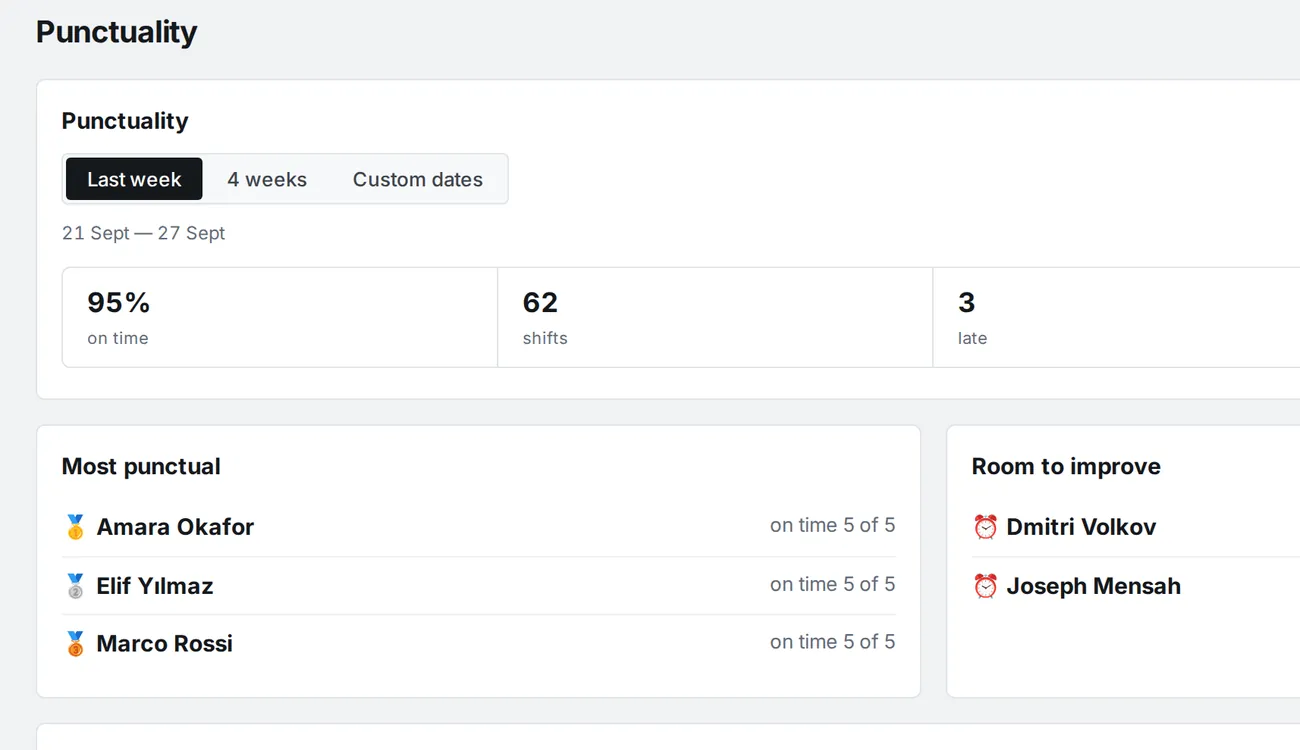
Punctuality rating

Share of on-time arrivals, late arrivals and shifts without a clock-in for a week, a month or custom dates. Top 3 most punctual and “room to improve”.

  • Every Monday at 09:00 a Telegram post to the owner and managers
  • Optionally to the whole team, each in their own language
  • Counted by the same rules as the lateness table
Punctuality rating: most punctual and room to improve

People and the employee card

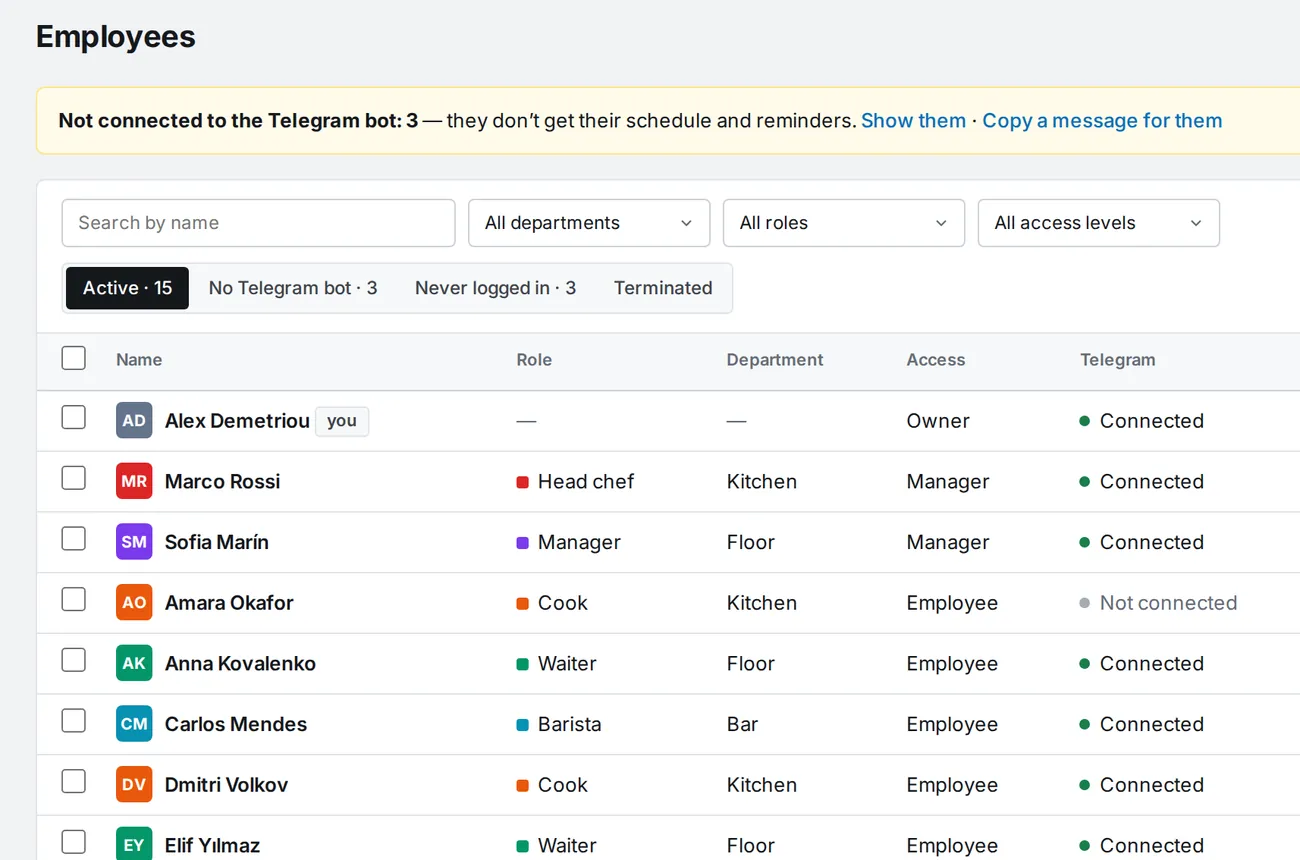
A team table: role, department, access, Telegram, last login. The card holds details, roles, pay rate, personal rules and leave, and the ‹ › arrows jump to the next person without going back to the list.

  • Invite link: people add themselves, or you upload a list from Excel / CSV
  • Who is not on Telegram is visible at once, and the instructions copy in one click
  • Annual leave allowance and balance in days and hours
Staff: role, department, access, Telegram, last login
🏖

Time off

Paid leave, sick leave, day off, unpaid. Annual allowance and balance in days and hours. Leave over shifts removes them after a warning.

🖨

Schedule export

A4 PDF for printing, an image for the team chat, or Excel. A week, a month or custom dates.

🏢

Several venues

Company → venues → departments → roles. A company switcher in the header and in the bot.

🌍

Four languages

App, bot and emails in English, Russian, Ukrainian or Greek. Every employee picks their own.

Phone and Telegram

A full app on the phone, and the same app inside Telegram

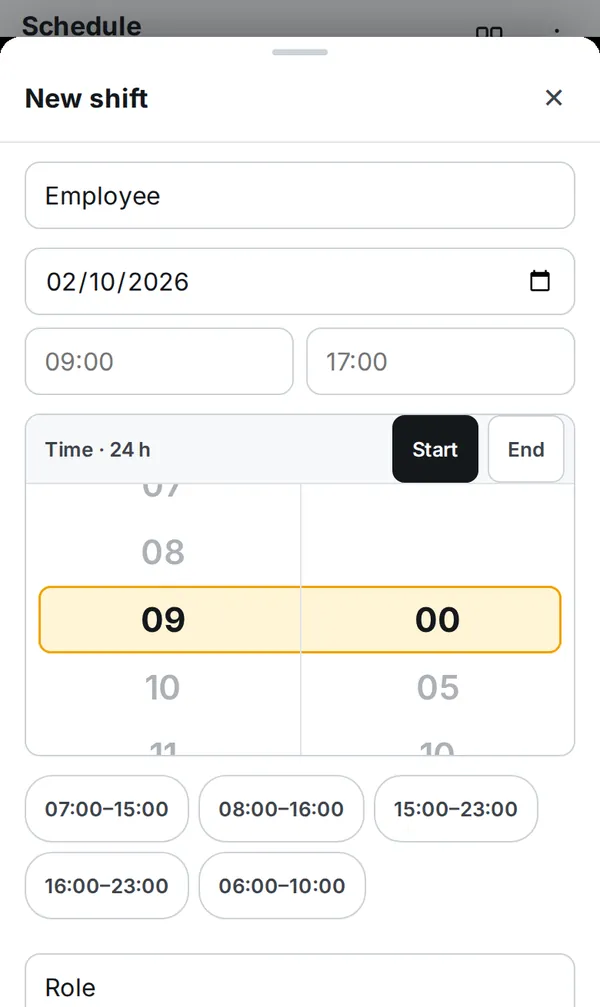
Tabs at the bottom, under your thumb. Dialogs slide up as sheets, times are picked on a 24-hour wheel. Open it in the browser or from the bot as a Mini App, where Back and Save are Telegram's own buttons. Android and iPhone apps are coming soon to Google Play and the App Store.

Week schedule
Week schedulePeople × 7 days, late and clocked-in marks, hours and labour %
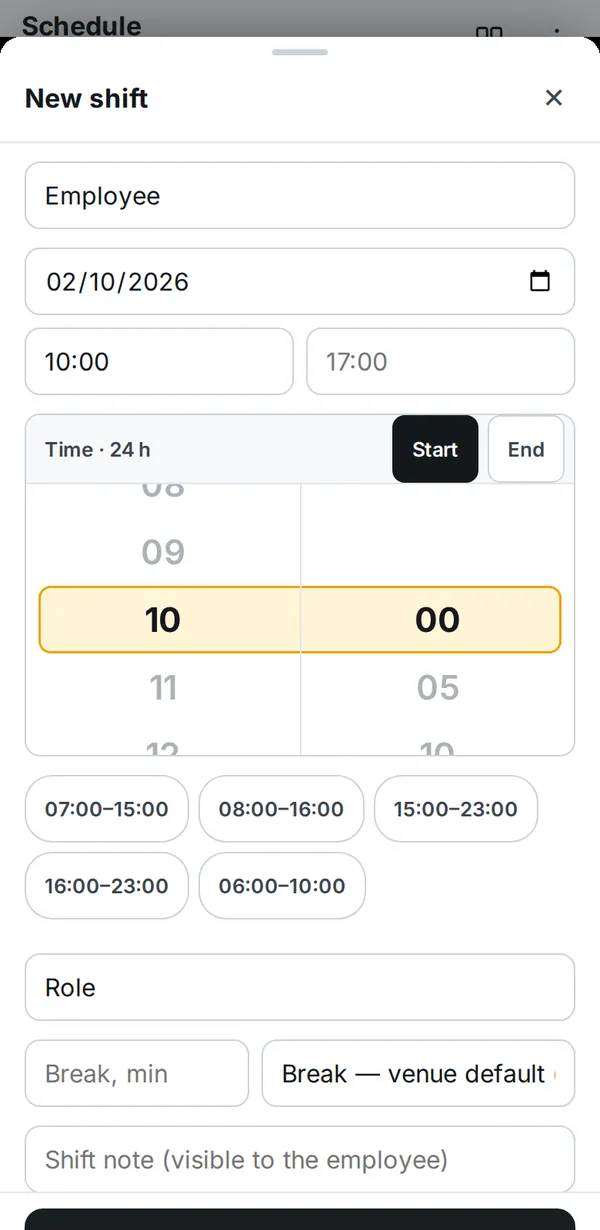
New shift
New shiftBottom sheet, 24-hour wheel, common shift times
Employee
EmployeeThe shift has started, with an “I'm on shift — clock in” button
CloseIzyShiftmini app⋯
Telegram Mini App
Save
Telegram Mini AppNothing to install, Telegram's own buttons

Right screens for each role

Managers get Today, Schedule, People, Reports. Staff get Today, My shifts, Hours.

Decisions in one tap

“Forgot to clock in”, a clock-in without a shift and requests arrive as cards with buttons right on Today.

Reports as cards

Hours & pay, lateness: one card per person with sorting, no sideways tables.

Clock-in methods

Clock in the way that suits your venue

Turn on one method or several at once. The clock-in is tied to the shift and lateness is counted automatically.

📟

Terminal by link

A tablet at the venue; everyone enters their own PIN. In and out in a couple of seconds.

✈️

Telegram bot

Clock in with a button in the chat. With manager approval if it's turned on.

📍

Phone, verified

From the app it works only on the venue's Wi-Fi or near it by location.

✅

Manager approval

If a check fails, the clock-in waits for the manager instead of being lost.

Clock-in terminal

Open a link on a tablet and the terminal is ready

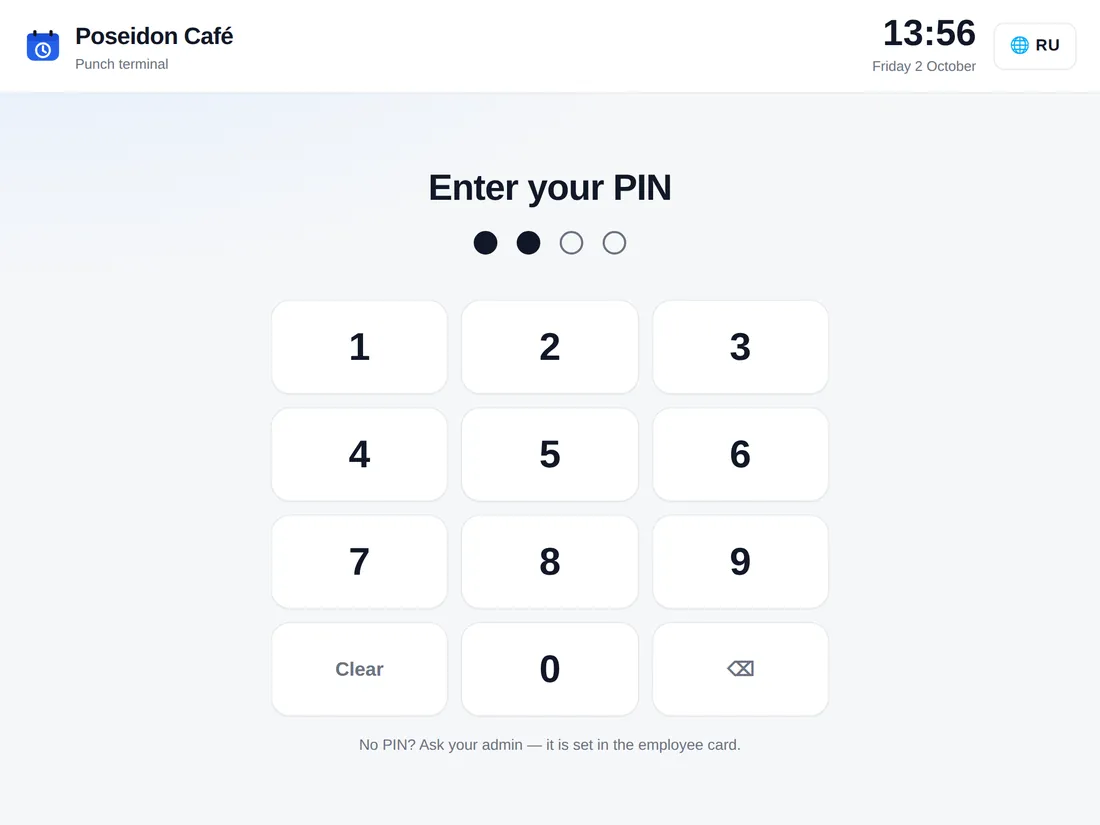
The owner copies the link or shows a QR code, the tablet at the bar opens it and becomes the terminal. Nothing to install. After the PIN a big status shows “On shift since 07:03” or “Not clocked in”.

  • A personal 4-digit PIN for everyone, and guessing hits a lockout
  • Refresh the link in one click and the old one stops working immediately
  • Venue-local clock, four languages to choose from
Clock-in terminal on a tablet: PIN entry
Error protection

A wrong clock-in does not slip through

We went through real terminal mistakes and closed each one.

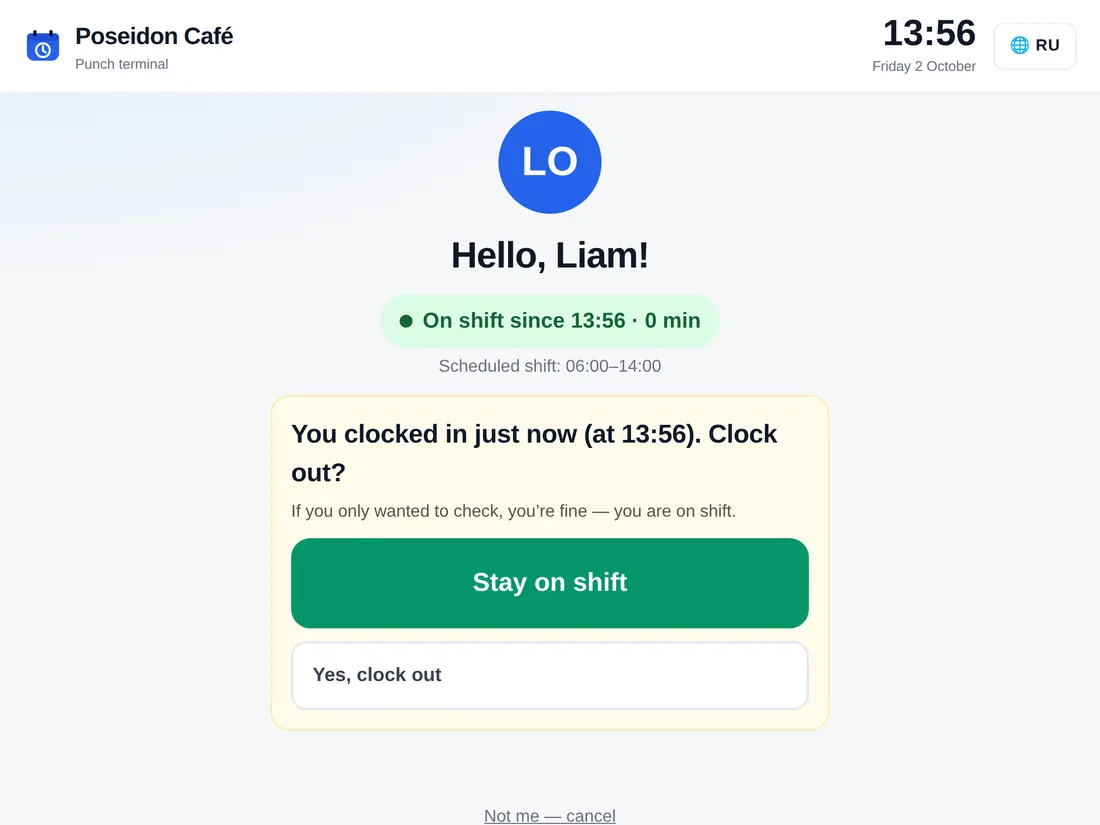
  • Clocking out a minute after clocking in asks “End your shift?” first
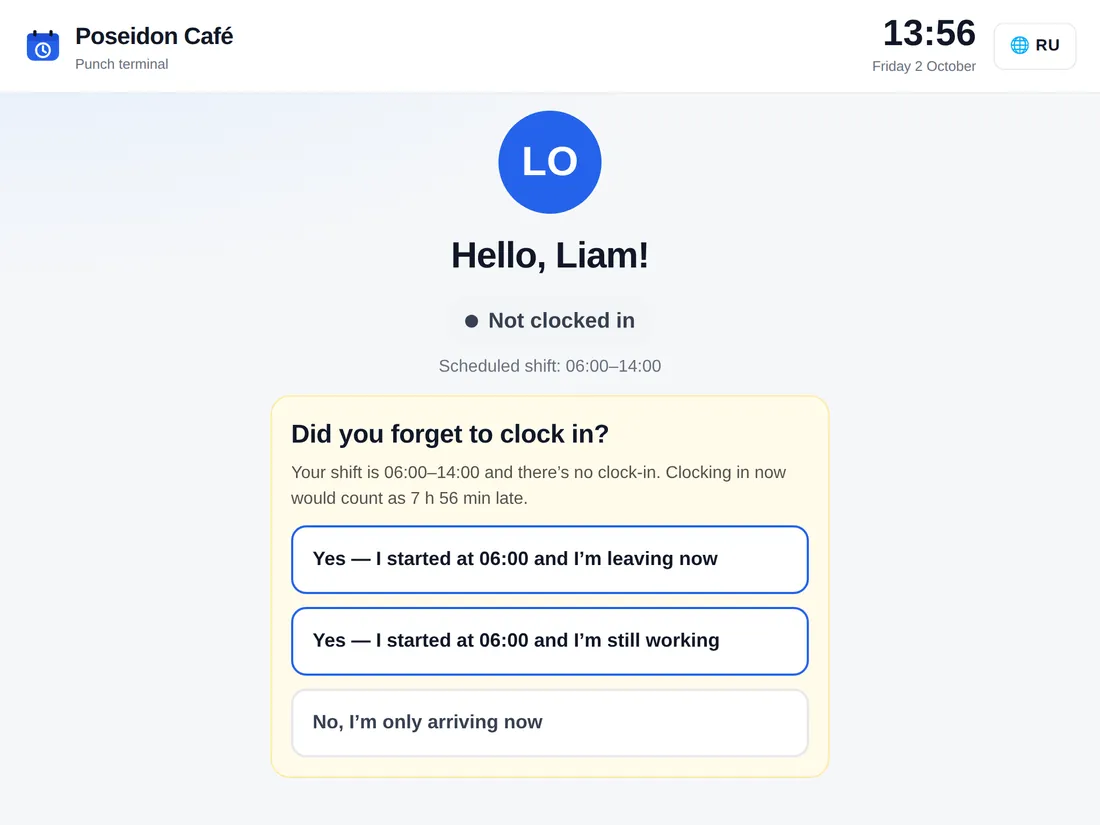
  • “Forgot to clock in?” sends a correction to the manager instead of recording a late arrival
  • An accidental second tap doesn't hit the button that just appeared
  • Suspicious clock-ins are flagged in the schedule: “check clock-in”
The terminal asks: did you forget to clock in?
The terminal double-checks a clock-out right after clock-in
Who it's for

Four access levels, each with its own screens

The server checks permissions on every request. A manager can be limited to their departments.

👤

Employee

Today's shift and an “I'm on shift” button. Their own hours by day, their time off, a day-off request in a couple of taps.

📋

Manager

Schedule, team, approving clock-ins and requests. A department manager sees and edits only their departments.

🛠

Admin

Everything the owner has except billing and transferring the company: pay rates, lateness rules, settings, Syrve.

📈

Owner

Hours, money and revenue, every venue, appointing admins. One owner per company, and role changes are logged.

Syrve integration

Revenue from Syrve, right next to labour cost

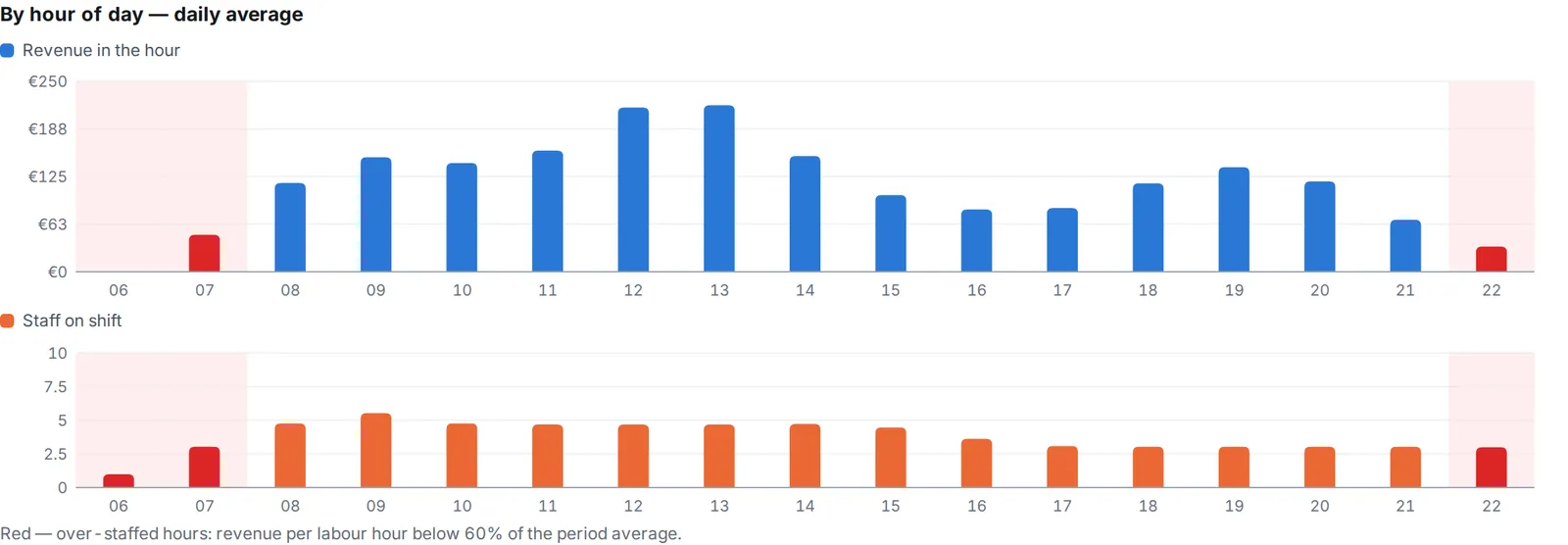
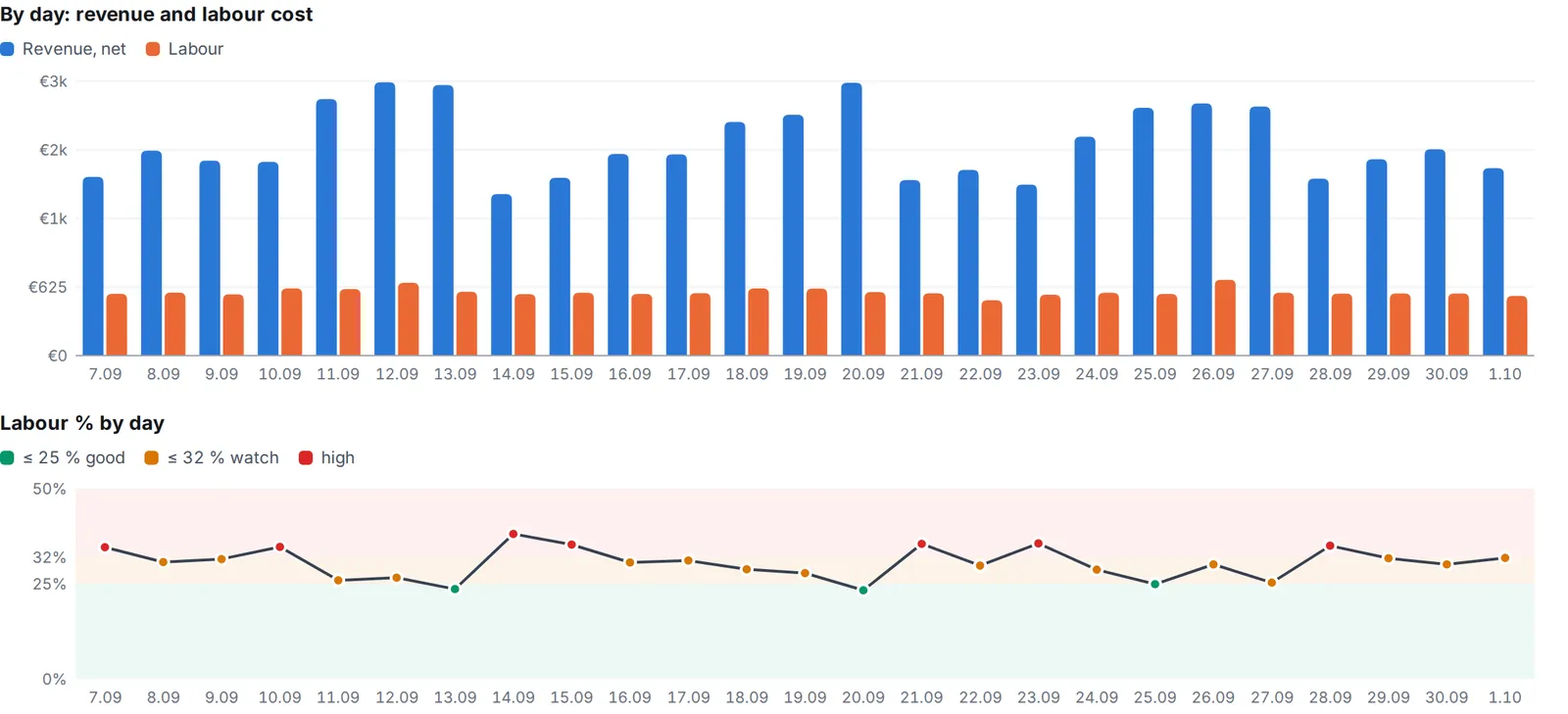
Connect your Syrve POS once. Every evening IzyShift pulls revenue by the hour and sets it against labour cost by day, by hour of day and by channel. You see labour % the next morning, not at month-end, right under every day of the schedule. Aloha, Lightspeed, Oracle Simphony and other POS — connected on request.

By hour of day: revenue and staff on shift, over-staffed hours in red. Demo data
By day: revenue, labour cost and labour % against your target band. Demo data
🔌

Connected in five minutes

Syrve server address, login and password in Settings. Revenue needs read-only access. The last 30 days load right away.

📅

Labour % under every day

Revenue, labour cost and labour % coloured by your target band. A revenue-per-hour line in the header of every past day.

⏱

Which hours you overpay

Revenue and orders per labour hour, average order, dine-in / takeaway / delivery. Over-staffed hours are highlighted. Excel for any period.

👤

Staff go straight into the POS

Add someone in IzyShift and they appear in Syrve with a role and a PIN for the POS. Dismiss them and their PIN login on the POS stops working.

🖐

Clock-ins from the POS

Staff clock in on the Syrve POS, including with a biometric scanner, and every 10 minutes the punches arrive in the IzyShift timesheet. You choose which wins: the POS or IzyShift.

🧭

Switched on step by step

Staff and POS clock-ins are switched on separately from revenue, with a review mode: first you see what would go to the POS, then it is written. Writing needs staff rights in Syrve.

Getting started

Half an hour from sign-up to the first week

Nothing to roll out or train. Upload staff and the schedule from Excel or CSV, or we move them over for you.

Register your venue

Name, departments and roles. Your login and password arrive by email, and you're in right away.

Invite the team

Drop the link in your work chat or upload a list from Excel, and invitations go out by email. Everyone picks how to be notified: Telegram, push or email.

Build the week and publish

By hand, from a week template or with autofill. Staff receive their shifts. Turn on the terminal or another clock-in method, and hours count themselves from there.

Pricing

Pay per venue, by the size of its team

Every feature is in every plan. A venue's price depends only on how many staff it has. Teams of more than five or a second venue get 14 days of any paid plan free, no card.

Free
up to 5 staff
0 €
single venue only
Start for free
Start
up to 10 staff
19 € / mo
per venue
Try it
Team
up to 25 staff
29 € / mo
per venue
Try it
Pro
more than 25 staff
45 € / mo
per venue
Try it
€9

Small venue in a group

Per month for a venue with up to 5 staff when the company has two or more venues.

−15% / −25%

Group discount

On the total for all venues: 2–4 venues −15%, 5 or more venues −25%.

−25%

Annual payment

On any plan, on top of the group discount.

€49

Turnkey onboarding

One-off per venue: we set up your staff and schedule and train the team. Free with annual payment.

Integrations

  • Syrve is included in every plan: sales and labour cost, sales per employee, staff and POS PINs.
  • Integrations with other POS systems are quoted individually.

Examples, € per month

MonthlyPaid annually
Café, 10 staff€19€14
Restaurant, 22 staff€29€22
Group: 4 venues × 15 staff€99€74

Prices in euros, excluding VAT.

Pay or get an invoice

Work out the price, then choose your country and currency — we'll show the right way to pay. Prices exclude VAT; invoices are in euros.

FAQ

Do staff need to install anything?

No. A browser or Telegram is enough: the app opens from the bot as a Mini App. A staff member opens the invite link, connects the bot and sees their shifts. The venue terminal is just a page opened by link on any tablet. Android and iPhone apps are coming soon to Google Play and the App Store.

How do staff hear about shifts if they don't use Telegram?

Each person picks their channels and their order: Telegram, push notifications in the phone's browser, or email. If the first channel isn't available, the message goes out through the next one. A reminder arrives the evening before and N minutes before the shift; no reminders during the company's quiet hours.

Can IzyShift build the schedule for me?

Yes. Autofill covers gaps against your staffing norms and open shifts, respecting position, availability, leave, rest between shifts and hour limits; it balances hours across people and keeps to a labour % budget based on the revenue forecast. Every suggestion says why that person was picked. Every shift lands as a draft, and you publish once you have checked.

Can I look around without signing up?

Yes. The demo in Telegram is your own copy of Poseidon Café for 24 hours with a made-up team: view it as the owner, a manager or an employee. Only you see your changes.

How do you verify someone actually showed up?

You choose, and you can combine methods: a terminal at the venue with personal PINs, phone clock-in only on the venue's Wi-Fi or near it by location, manager approval. The clock-in is tied to the shift and lateness is counted automatically.

What if someone forgets to clock in or taps the wrong button?

The terminal asks “Forgot to clock in?” and the correction goes to the manager for approval. Clocking out right after clocking in needs a confirmation. If there is no clock-in at all, after N minutes the manager gets a no-show message.

How does lateness affect pay?

The way you set it up. A grace period in minutes, and beyond it one of four options: just flag it, pay from the minute of arrival, round to a step, or deduct hours. You can give an employee a personal rule and waive the rule for a single shift with a comment. The employee gets a message about the correction right away.

What data do you take from Syrve?

Only sales by the hour: revenue after discounts, number of orders and channel: dine-in, takeaway, delivery. No guest data, no menu. Access is read-only. Only the owner and admins see revenue and labour cost.

We keep the schedule in another program or in Excel. Can we move over?

Yes, and on your own: upload staff and the schedule from Excel or CSV, from our template or your own file, with a preview and per-row errors. Shifts arrive as drafts and invitations go out by email. Or order turnkey onboarding and we move you over.

Is there a free trial?

Yes. A single venue with up to 5 staff is free. If you have more people or need a second venue, you can take any paid plan (Start, Team, Pro) for 14 days with no card. We remind you 3 days and 1 day before it ends. If you do not pay, the company goes back to Free, or with more than five people access is locked until payment. Your data is kept.

What happens if we don't renew?

The account is locked, the data stays: schedules and clock-ins are needed for payroll. Pay, and everything is back.

Where is the data stored?

On servers in the European Union. Only a company's managers can access its data, and permissions are checked on the server on every request.
Try it with your team

Free for up to 5 staff. Bigger teams try any plan for 14 days with no card. Sign-up takes two minutes.